If your ad dashboards report fewer purchases than your bank account does, you're not imagining it. Browser pixels miss conversions — and the ad platforms then optimise on an incomplete picture, spending your budget on the wrong people.
Server-side tracking is the fix. Here's why the gap exists, how the server-side APIs close it, and the simplest way to set them up.
Why browser pixels miss conversions
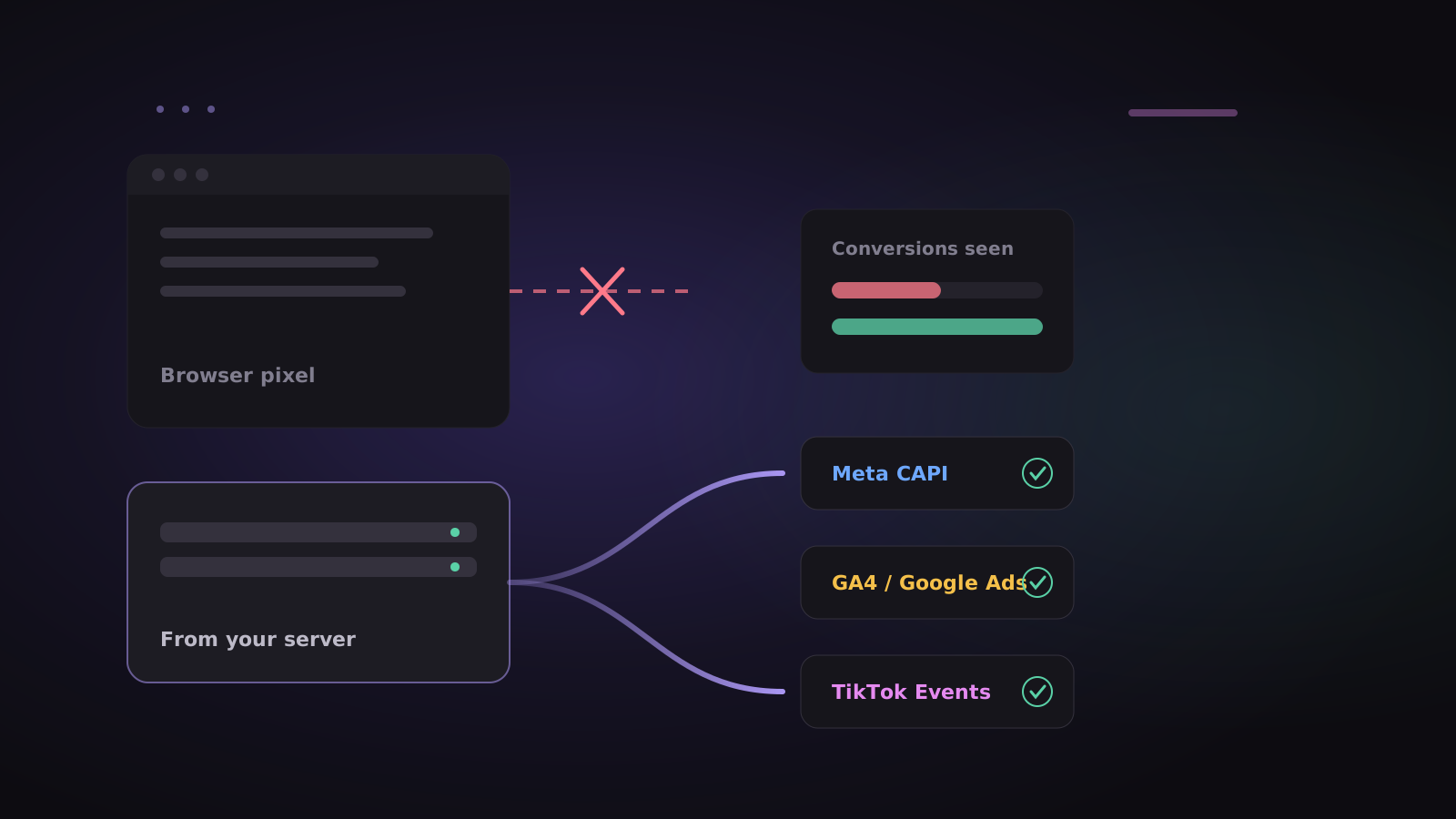
A pixel is JavaScript that runs in the visitor's browser and reports back to Meta, Google or TikTok. That works until something stops it:
- Ad blockers block the pixel's requests outright.
- iPhone privacy settings and browser tracking protection limit cookies and cross-site tracking.
- The page closes too soon — a payment redirect, a slow connection, a user who taps back.
Every missed conversion is a sale the platform never learns about. Its algorithm then has less signal to find more customers like your real ones.
How server-side tracking fixes it
Each platform offers a server-to-server API that receives conversions from your backend instead of the visitor's browser:
- Meta Conversions API (CAPI)
- Google Analytics 4 Measurement Protocol — Google Ads then imports those conversions from GA4
- TikTok Events API
Because the conversion is sent from a server after it actually happened, ad blockers and browser settings don't get a vote. To credit the conversion to the right ad, the server sends identifiers the platform can match: a hashed email or phone, the ad's click ID, and for browser events the IP address and user agent.
Run it alongside your pixel, not instead of it: if both send the same event with the same event ID, Meta and TikTok count it once.
The usual problem: it's an engineering project
Doing this by hand means, for each platform: an API integration, hashing and normalising emails and phones the way that platform expects, capturing click IDs from landing pages, de-duplicating against the pixel, retrying when the API is down, and monitoring all of it. Then doing it again for the next platform.
Doing it from your analytics instead
If your product events already flow into an analytics tool, that tool has everything the ad APIs need. ClickLens's Ad Sync uses that:
- Connect a destination — Meta Ads (Conversions API), Google Analytics 4, TikTok Ads (Events API), or any webhook for Zapier, Make or n8n.
- Map your events to the platform's standard names —
Paidto Meta'sPurchase,Signed uptoLeador Google'sgenerate_lead. Add a value property and a currency so the platform knows what each conversion was worth. - Test with the platform's test event code, then go live.
Behind the scenes, Ad Sync:
- Hashes email and phone with SHA-256 before they leave ClickLens, normalising Indian numbers without a country code.
- Captures ad click IDs automatically — Google's
gclid, Meta'sfbclid, TikTok'sttclidand Microsoft'smsclkid— from the landing page, through the JavaScript SDK. - Keeps each event's own ID, so your pixel and the server don't double-count.
- Retries if a platform is down, and shows a delivery log with the platform's own error messages.
Your access tokens are encrypted at rest and never shown again after you save them.
Which events to send
Send few, high-value events, using the platform's standard names so its algorithm knows what they mean:
| Your event | Meta | Google (GA4) | TikTok |
|---|---|---|---|
| Signed up | Lead |
generate_lead |
CompleteRegistration |
| Paid | Purchase |
purchase |
CompletePayment |
Then you get the other half of the picture for free: the same events power your funnels and retention in ClickLens, so you can see what those ad-driven signups did next.
Start free with 2 million events a month, and connect your first destination under Data → Ad Sync.